ChatGPT Business Data Privacy and Copilot: Plan by Plan
Data privacy in workplace AI assistants comes down to four questions about every prompt an employee sends: does it train a model, who can read it, how long is it kept, and in which country is it processed. This article answers those questions for ChatGPT business data privacy and for Microsoft Copilot, plan by plan, as of October 2026. It then covers what Quebec’s Law 25 expects from a small business before staff paste client information into either tool, and ends with a five-step setup.
A typical case looks harmless. An office manager copies a client’s file into a personal ChatGPT Plus account to draft a reply. The reply is good. But the company has no contract with OpenAI covering that file, the account may be feeding model training, and the text has just left Quebec. None of the three shows on screen.
The plan type decides model training, not the price
OpenAI splits its offer into services for individuals and services for organizations, and that split matters more than the monthly fee. Free, Plus and Pro are individual plans. On those, OpenAI may use conversations to improve its models unless the user switches off the option named “Improve the model for everyone” in the Data controls section of Settings, or files a do-not-train request in the Privacy Portal, according to OpenAI’s help article on model training, updated in October 2026.
There is a catch that few guides mention. On an individual plan, rating an answer with a thumbs up or a thumbs down can hand the whole conversation over for training, even after the user opted out. In ChatGPT Business, Enterprise and Edu, the same vote does not authorize training, and admins can remove the feedback buttons for the whole workspace.
Business and Enterprise content is excluded from training by default. The only way in is an explicit opt-in or a separate agreement signed by the organization, per OpenAI’s enterprise privacy page, updated January 8, 2026. A Plus subscription paid with a company card is still an individual plan. Consumer tiers from other vendors raise the same issue, which is also why sharing a personal AI subscription with your team runs into the vendors’ terms.
Microsoft draws the line by sign-in rather than by price. Copilot Chat, opened with a work or school account, comes with what Microsoft calls enterprise data protection at no extra cost, and a green shield next to the New Chat button shows it is active. Prompts and responses under that protection do not train the foundation models, per Microsoft’s Copilot Chat privacy page, updated August 24, 2026. Note that Microsoft dropped “365” from both names in 2026: the paid Microsoft 365 Copilot became Microsoft Copilot, and the free chat became Microsoft Copilot Chat. Microsoft says the commitments did not change with the names.
ChatGPT business data privacy: who can read the chats
A model that does not train on your data can still have people reading it. Three parties can see a ChatGPT Business conversation: the employee, the employer, and OpenAI in narrow cases.
For the employer, OpenAI’s own pages do not say quite the same thing. The ChatGPT Business help article, updated October 26, 2026, stresses that each member keeps a separate history, that colleagues cannot browse it, and that usage dashboards show credits rather than transcripts. Yet the same article explains that the workspace owner can export a member’s data, and the January 2026 enterprise privacy page states that Business admins can view, export and delete members’ conversations. The safe reading for staff: a Business workspace is private from coworkers, not from the company.
On OpenAI’s side, access to stored business conversations is limited to authorized employees handling engineering support, abuse investigations or legal obligations, plus outside contractors bound by confidentiality who review for misuse. Data is encrypted at rest with AES-256 and in transit with TLS 1.2 or higher. ChatGPT Business has passed a SOC 2 Type 2 audit, and OpenAI will sign a data processing addendum (DPA) for Business and Enterprise customers.
Retention is where the two plans differ most. Enterprise admins choose how long conversations are kept. For Business, OpenAI’s privacy page lists retention control under Enterprise, Edu and Healthcare only, while its Business FAQ says workspace admins control it too, so check the admin console rather than assume. In both plans, a deleted conversation leaves OpenAI’s systems within 30 days, unless the law requires keeping it longer. One more Business limit: shared links can be deleted one at a time but cannot be switched off for the whole workspace. That control exists only in Enterprise.
Microsoft Copilot data is logged and follows your permissions
Copilot Chat on a work account answers from the public web, not from company files. Organizational content comes in only when the user pastes it, uploads a file, has a document open in Word, Excel or PowerPoint, or uses Copilot Chat inside Outlook, where it can reach that person’s mail, calendar and some OneDrive and SharePoint files. Uploaded files are kept in the user’s OneDrive for Business.
Every prompt and response is logged and stored in Exchange, where admins can search it for audit and eDiscovery and apply Microsoft Purview retention policies. That helps with compliance, and it is worth telling employees: their Copilot history is a business record.
The web search step sits outside enterprise data protection. To ground an answer, Copilot turns the prompt into a few search words and sends them to Bing without any user or tenant identifier. Bing handles those words under Microsoft’s general services terms, with Microsoft acting as an independent controller rather than as your processor. Microsoft’s own example shows a question about a possible acquisition becoming two short queries built around the target company’s name. The full prompt stays home, but the name travels.
The paid Microsoft Copilot license goes further: it reads Microsoft Graph, meaning the emails, chats, meetings and documents each user is allowed to open, according to Microsoft’s Copilot data and privacy documentation, updated August 18, 2026. It never shows anyone content beyond their existing rights. The flip side is that every overshared SharePoint folder becomes one question away. The same principle applies to AI agent permissions for a shared Slack agent: access rules have to be right before the assistant arrives. Microsoft also states that Copilot has opted out of the human-review abuse monitoring offered in Azure OpenAI.
Canadian data: stored in Canada at best, processed elsewhere
Location is where many Quebec buyers assume more than vendors promise. Two things are separate: where content is stored at rest, and where the model actually runs on it, which OpenAI calls inference.
OpenAI’s data residency article, updated in October 2026, lists Canada among ten storage regions for ChatGPT. The option is open to new Enterprise and Edu customers and to eligible API customers, and it costs nothing extra on Enterprise. Inference residency, the promise that GPUs process your content in-region, exists only for Europe, the United States and the United Arab Emirates. Even with storage in Canada, some data stays out of scope: workspace metadata, billing, logins, anything sent to connected apps, MCP servers or web search, and CPU steps such as pulling the text out of an uploaded Word or PDF file. ChatGPT Business does not appear among the eligible plans at all.
Microsoft is explicit in its Copilot documentation:
“Customers outside the EU may have their queries processed in the US, EU, or other regions.” - Microsoft, Data, Privacy, and Security for Microsoft Copilot
In November 2025, Microsoft announced in-country processing of Microsoft 365 Copilot interactions (the paid product, now Microsoft Copilot) for Canada during 2026. Copilot Chat was not named in that plan. An editor’s note added on April 3, 2026 moved Canada to 2027, behind Australia, India, the UAE, the United Kingdom and the United States, which are expected by the end of 2026. Until then, a Quebec company should plan as if Copilot prompts are processed outside Canada.
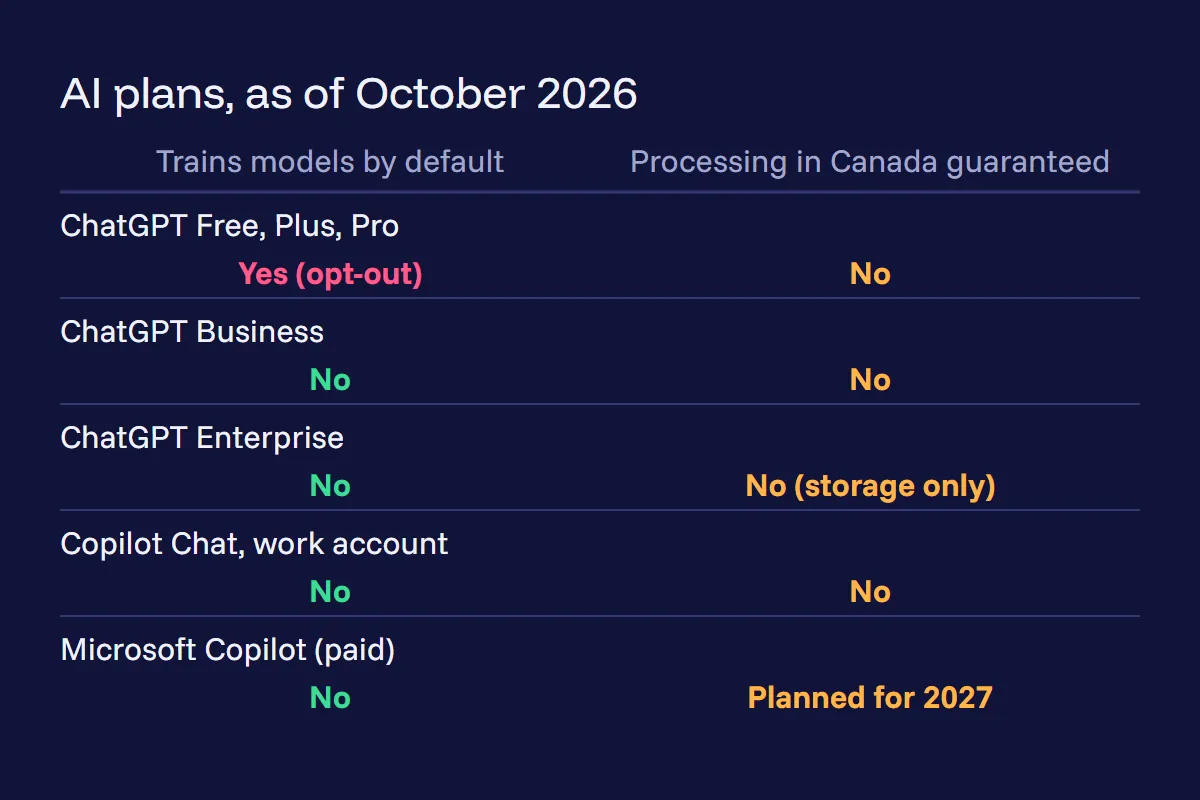 Training defaults and guaranteed Canadian processing by plan, as of October 2026. Sources: OpenAI help center, Microsoft Copilot documentation and Microsoft’s April 2026 update.
Law 25 requirements before staff paste personal data
Quebec’s private-sector privacy act, chapter P-39.1, as amended by Law 25, does not ban these tools. It asks for paperwork that many small businesses have not done yet. Four provisions carry most of the weight.
Section 17 is the central one. Before sending personal information outside Quebec, or before having someone outside Quebec collect, use, share or store it on the company’s behalf, the business must run a privacy impact assessment, known in French as an EFVP. The assessment weighs how sensitive the information is, why it is used, which protections apply (contractual ones included) and the privacy law of the destination. The transfer may proceed if the assessment shows adequate protection, and a written agreement must reflect its findings. Given where processing happens, this section reaches both ChatGPT and Copilot.
Section 3.3 calls for the same type of assessment for any project to acquire or overhaul an information system that handles personal information, scaled to the sensitivity and volume of the data. Rolling out an AI assistant to staff fits that description. Section 18.3 adds that a provider handling personal information must be engaged in writing, with the confidentiality measures spelled out. OpenAI’s DPA and Microsoft’s Data Protection Addendum are the documents to file next to the assessment.
Section 3.1 names who answers for all of this: the highest authority in the company, unless the role is delegated in writing, and the person’s title and contact details must be published on the company’s website. Section 12.1 matters as soon as an AI tool makes a decision about a person on its own, such as screening job applications: that person must be told, and can ask for a review by a staff member.
Back to the office manager. In our reading, a client file pasted into a personal account has no written agreement behind it, no assessment, and possibly a training setting left on. The act counts unauthorized communication of personal information as a confidentiality incident, which belongs in the incident register every business must keep. Whether a given paste qualifies is a question for your privacy officer or lawyer, but the exposure is easy to close.
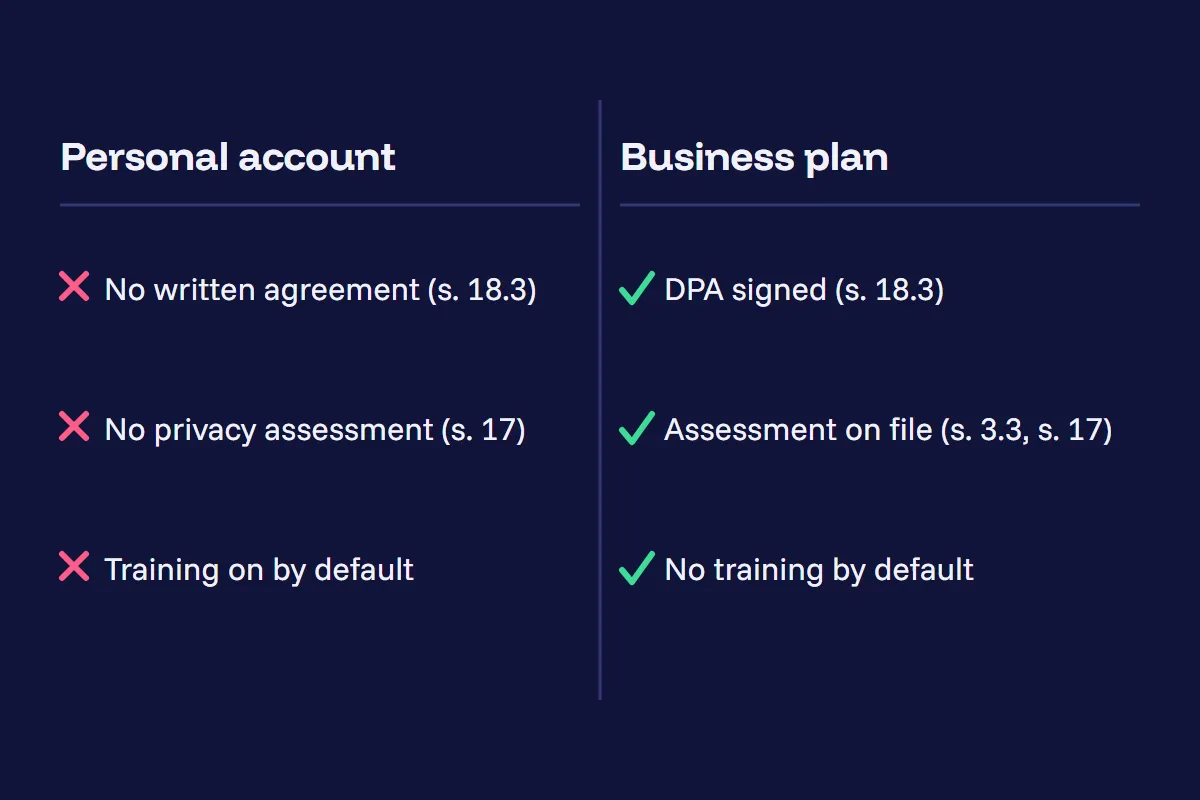 What a business plan adds under Law 25, in our reading: a written agreement, a documented assessment and no training by default.
Five steps to close the gaps in a small business
Our recommendation for a Quebec company of five to fifty people is an opinion built on the documents above, not legal advice:
- Pick one business plan and pay for it. ChatGPT Business or Enterprise, or Copilot Chat signed in with work accounts. Enterprise is the only ChatGPT plan with Canadian storage.
- Ban personal AI accounts for work content, in writing. Explain the three reasons: training defaults, the feedback catch, and the missing contract.
- Sign the vendor’s data processing addendum and file it with a short privacy impact assessment that records where data is stored and where it is processed.
- Reduce what leaves the workspace. Review connected apps and connectors, and have an admin turn off Copilot’s web grounding for teams that handle sensitive files.
- Clean up permissions before buying Microsoft Copilot licenses. Audit SharePoint and Teams access, then set a Purview retention policy for Copilot interactions.
The tools in 2026 are more careful with business data than their 2023 reputation suggests, but only on the right plan, and only with the paperwork Quebec asks for.